Table of Contents
- The Municibid Auction Assistant
- Light Mode, Dark Mode, and a More Personal Homepage
- Auction Calendar
- Better Maps, Better Location Context
- Bid Timelines and More Auction Context
- A Better Watch Page
- Municibid Metrics
- Search Municibid Like You Talk
- Municibid AI Tools
- The Municibid Mobile App Is Coming
- New This Week: Live Activity Alerts
- A Few Recent Auction Highlights
- First-Time Sellers and Weekly Picks
- Tune in to Municibid Mondays
After 20 days of feature reveals, live streams, giveaways, seller stories, bidder stories, and one very full 20th anniversary celebration, we learned something simple: we really like connecting with you live.
So we’re keeping it going.
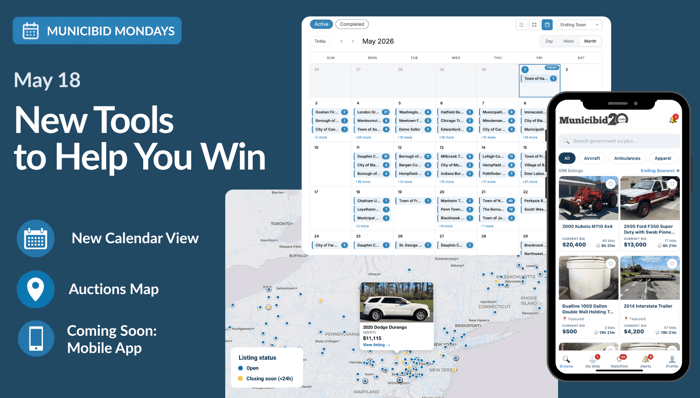
Our first Municibid Mondays Live, held Monday, May 18, picked up right where the 20 Days of Municibid left off. We recapped the newest tools we launched for bidders and sellers, answered a live pickup question, welcomed new agencies, and looked at a few recent auction highlights from the wild world of government surplus.
During the 20 Days of Municibid, we introduced updates like Watchlist with Map View, Municibid Metrics, the new search page, Municibid AI tools, and a first look at the coming Municibid mobile app. We also celebrated our 20th anniversary with 20 unique prizes for 165 winners, including a $5,000 travel voucher grand prize.
This first Municibid Monday Live gave us a chance to slow down and walk through what those updates actually do: help bidders find the right items, follow auctions more easily, understand location and timing, and make more informed decisions before bidding.
Here’s what we covered.
The Municibid Auction Assistant
The first feature from the 20 Days of Municibid was the Municibid Auction Assistant, our Chrome extension for bidders who want an easier way to keep track of auctions.
With the extension installed, you can right-click on a Municibid auction page and set an alert for that item. You can also use Nearby Auctions to search by ZIP code or current location, then set a radius up to 500 miles.
One of the most useful tools is Scouts. If you are browsing a category, location, or search page, you can save it as a Scout and get notified when new items match that search. For example, if you are watching automotive auctions in New Jersey, you can save that search and let the extension keep an eye on new listings for you.
Light Mode, Dark Mode, and a More Personal Homepage
Municibid now supports light mode, dark mode, and system mode. If your computer is set to dark mode, Municibid follows that preference automatically. If you want to switch manually, you can do that too. Click the sun or moon icon in the header to change your display mode.
We also rolled out homepage personalization. When you are logged in, your homepage now surfaces auctions you are bidding on, items you are watching, and recommendations based on the categories you have viewed, watched, or bid on.
The goal is simple: the items you are most likely to care about should be front and center for you.
Auction Calendar
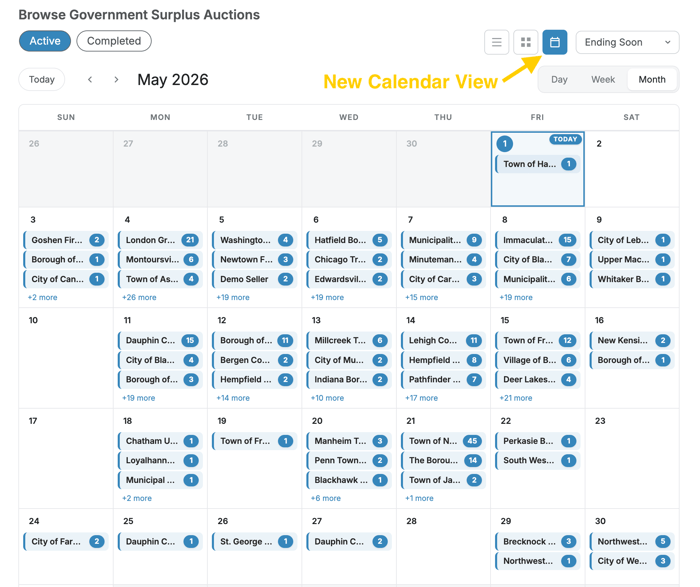
The auction calendar gives bidders another way to browse by timing.
Instead of only searching by category or scrolling through a list, you can scan auctions by date and see what is active or completed. That is especially useful when you are planning pickup routes, watching several items at once, or trying to see what is closing soon without hopping between pages.
Better Maps, Better Location Context
Location matters in government surplus. Many items are picked up in person, and the distance between "a great deal" and "a lot more driving than expected" can make a real difference.
That is why we rebuilt and expanded our map tools.
You can now browse active auctions on the Municibid map, using the map icon at the top of the site or by going directly to municibid.com/map. Blue markers show sellers with live auctions, while yellow markers indicate items closing within 24 hours. Larger circles represent sellers with more active auctions.
We also added improved maps to listing pages, including nearby active listings and a "Get Directions" button. That should help bidders confirm exactly where an item is located before they bid.
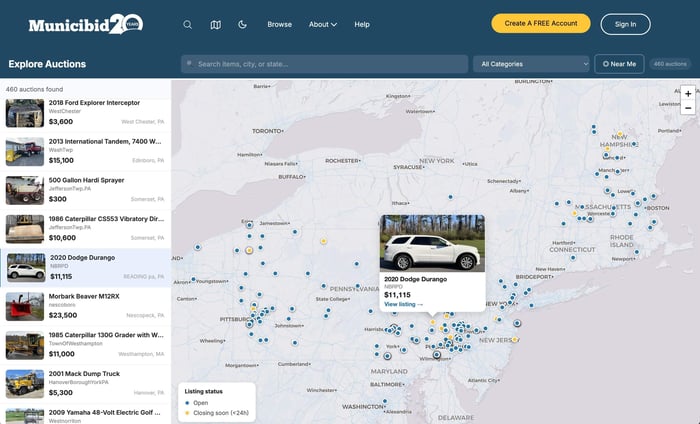
“It’s happened many times in the past where bidders have won something and then realized, ‘Oh, this is the wrong Springfield Township. I thought it was the one near me.’ So I think it’s great that the map shows exactly where it is, gives directions, and makes it easy. I think it’ll cut down on things like that happening.” — Jackie Blaskovich, Director of Customer SuccessBid Timelines and More Auction Context
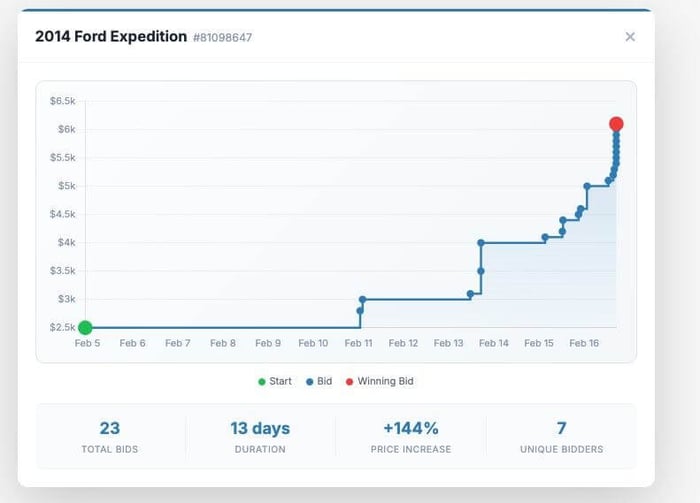
Every auction page now includes a bid timeline, giving bidders a visual look at when bids were placed over the course of the auction.
That helps show the rhythm of an auction. Some items get early interest, go quiet for a while, and then see a burst of activity near closing. The bid timeline makes that pattern easier to understand at a glance.
We also added more auction stats, including number of bids, price increase over time, auction duration, and number of bidders.
A Better Watch Page
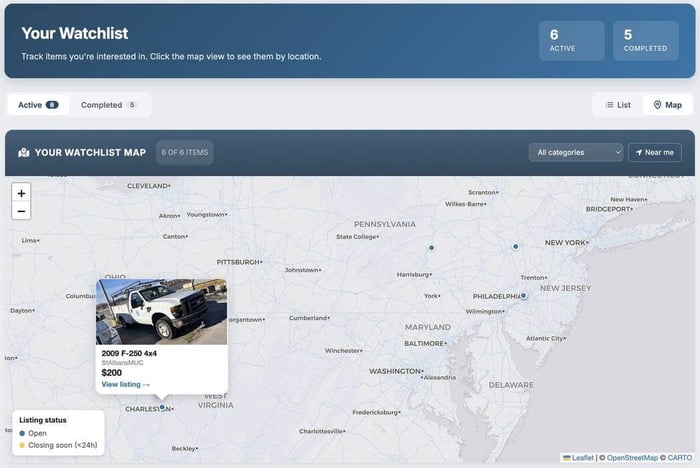
The updated watch page gives bidders a clearer view of the items they are following.
You can see active watched items, items closing soon, completed items, and a map view of watched auctions. If you were curious about an item but did not end up bidding, you can go back later and see what it sold for without trying to remember the listing.
That makes the watch list useful whether you are actively bidding or just learning the market.
Municibid Metrics
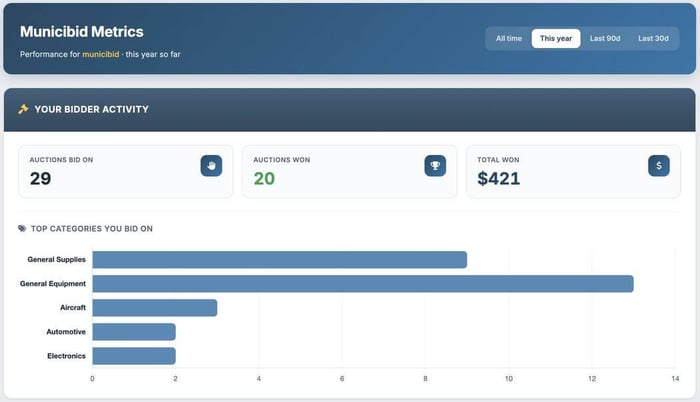
Municibid Metrics gives users a clearer look at their own activity.
For bidders, that means being able to see bidding history, items won, total won, and category activity across different timeframes such as all time, this year, the last 90 days, the last 30 days, or a custom date range.
For selling agencies, Municibid Metrics can help make seller data easier to understand and use. Many agencies sell across multiple departments, and many bidders are small businesses watching costs carefully. Better data helps both sides see what is happening without having to dig through raw history.
We will keep building on this. If there is a number, trend, or view that would help you understand your activity better, let us know.
Search Municibid Like You Talk
Search also got a major update.
Instead of trying to guess the exact keyword combination, you can search the way you would say it: "cars in PA," "pickup trucks under $15k," or "police SUVs and Ford Explorers 2020 or newer."
Search now also includes recent searches, saved searches, map view, list view, and an updated advanced search.
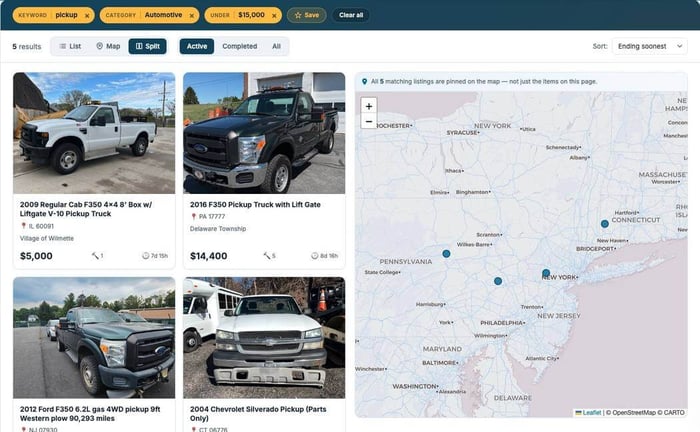
That makes it easier to move from "I know what I need" to "here are the auctions worth looking at."
Municibid AI Tools
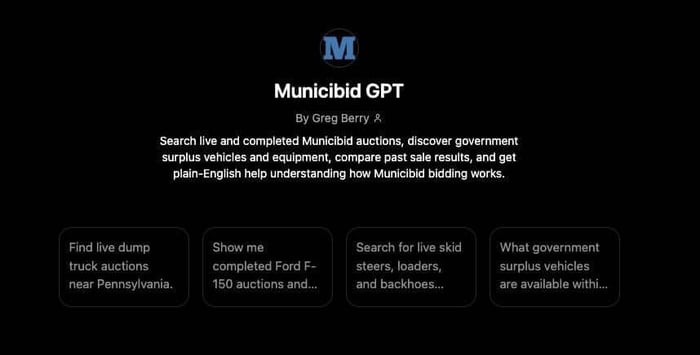
We also covered the Municibid GPT, now available through ChatGPT's GPT Store.
The Municibid GPT lets users search Municibid from inside ChatGPT. You can ask about active listings, look for items in a specific location, or review previously closed items. If you are researching a specific year, make, and model, you can ask for comparable closed sales over a selected timeframe.
The official Municibid ChatGPT app just launched, which offers a more complete experience with listing images and richer results. A Claude integration is also on the way.
The larger idea is the same one behind the rest of these updates: make government surplus easier to access wherever people already are.
The Municibid Mobile App Is Coming
The Municibid mobile app is coming soon to iPhone and Android.
The iPhone version is expected first, with Android following after. The app will require a free Municibid account, and push notifications will be one of the biggest benefits. Outbid alerts and closing-soon alerts are especially useful when auctions are moving quickly.
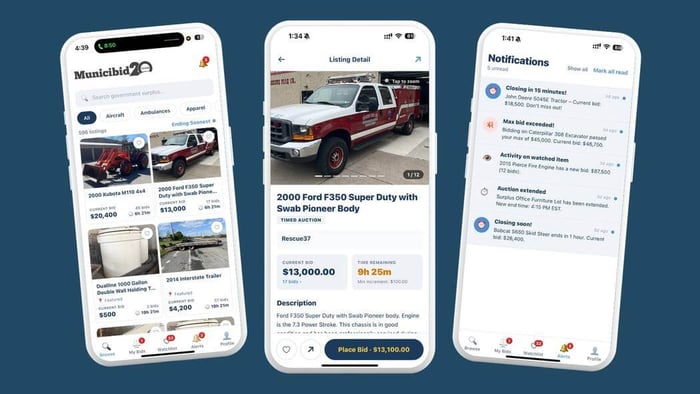
“I think people are really going to like the push notifications. Outbid alerts and closing-soon alerts are going to be extremely helpful.” — Jackie Blaskovich, Director of Customer SuccessSign Up for the Mobile App Launch
New This Week: Live Activity Alerts
We also introduced a new feature during the episode: live activity alerts.
When you are on Municibid, you will see a small bell icon. You can move it around the screen, turn it off, or use it to see live activity such as bids placed, auctions starting, items closing, and new listings.
When you are logged in, the alerts can also show activity tied to items you are bidding on or watching.
It is a small feature, but a useful one. Online government surplus auctions have a lot of activity. Now you can see more of it as it happens.
A Few Recent Auction Highlights
We also looked at several recent sales and current listings.
A 2017 Isuzu street sweeper from Norristown, Pennsylvania sold for $53,000. Another sweeper sold for $42,600. A Kubota tractor from Hepburn Township in Cogan Station, Pennsylvania sold for $26,800, and a John Deere from the Town of New Boston, New Hampshire sold for $24,200.
Those are the kinds of listings where the details matter: condition, location, bidding activity, pickup logistics, and timing all shape the final result.
We also welcomed several new selling agencies, including the City of Carterville in Missouri, the Village of Brownsville in New York, the Town of Oakham Highway Department in Massachusetts, Spring Valley Township in Ohio, and the City of Le Sueur in Minnesota.
Municibid continues to welcome roughly 500 new governments each year, or about 50 per month. That growth comes from agencies looking for a better way to sell surplus, and from bidders who tell local governments about their own Municibid experience.
First-Time Sellers and Weekly Picks
We also highlighted several first-time sellers and notable listings, including a utility body truck from the Town of Hatfield in Massachusetts, lateral lining equipment from Dallas Area Municipal Authority, and a Ford F-550 with a plow and spreader in Coburn, Pennsylvania.
On the "coolest item of the week" front, the team picked an AM General Humvee. No mystery there. Some vehicles just have a way of making everyone who grew up around 1990s action movies sit up a little straighter.
And for the "something I would buy if we were allowed to bid" pick, we looked at a vintage piano. Musical instruments show up on Municibid more often than people might expect, and they can be a great way to find a used instrument for a school, a family, or anyone looking for a second-life bargain.
Tune in to Municibid Mondays
Municibid Mondays will be live every Monday at noon Eastern.
We will keep sharing new features, seller welcomes, auction highlights, buyer questions, and the occasional item that makes us stop scrolling for a minute.
Follow Municibid on social media at @municibid and create a free account at municibid.com. Next Monday is Memorial Day and we hope you have an incredible holiday weekend. Join us on Tuesday, May 26 at Noon ET!