



30 photos
Upload your photos and videos. We'll write the listings.
Drop in photos and videos of one item or a whole yard of surplus. We'll sort them, create a draft listing for each item and let you know when they're ready for you to review, set prices and post.
Nothing goes public until you approve it.
107 → 8
Photos and videos in, finished drafts out, in one upload
300
Photos you can add at once, plus videos
3
Photos per item is all a listing needs
0
Listings made public before you approve them
From your camera roll to draft listings in a snap.
Here's the whole process, start to finish. Watch what happens to 107 photos and videos of eight very different items.
How much time will this save you?
Move the sliders to match your next batch. Writing listings by hand adds up fast. Checking a draft that's already written doesn't.
Your numbers will vary by item; a vehicle takes longer to check than a chair.
Time you get back
1 hr 52 min
That's 93% less time spent on listings.
Upload, review, post. We handle the writing.
You bring the photos and videos and keep the final say. We do the sorting and the writing in between.
1
Add your photos and videos
Click Sell, then drag your photos and videos onto the page or browse your files. One item or fifty items can go in the same upload. For vehicles, include a clear shot of the VIN plate and the odometer.
You, about 5 minutesDrop your photos or a video hereBrowse your files
2
We build your drafts and let you know
We work out how many items are in your upload, group the photos and videos, put each item's photos in order, and pick the main photo. Then we choose a category and write a title and description for each one. For a vehicle, we also read the year, make, model, VIN, and miles and verify the VIN.
Once your upload finishes, you can close the tab. We email you when your drafts are ready.
- Working out how many items are in here
- Creating your 8 listings
- Putting the photos in order
- Writing listing 1 of 8
- Your 8 listings are ready
2025 Jeep Grand Cherokee L SUV
Black Jeep Grand Cherokee L, a three row midsize SUV with leather interior…
Year2025
VINVerified
Miles17,565
3
Check it, price it, post it
Read each draft and fix anything that's off. Add condition details only you would know, set your starting bid and end date, then approve the description and click Post Listing Live.
Starting bid $4,500
I've read the description, corrected anything wrong, and approve it for publication.
Post Listing LiveWe do the typing. You keep the final say.
Municibid fills in
- Sorting which photos and videos belong to which item
- Photo order and the main photo
- Category for each item
- Title and description written from your photos and videos
- Year, make, model, VIN, and miles read from vehicle photos, with the VIN verified
- Your terms and payment details from your saved settings
You decide
- Starting bid and an optional reserve
- Start and end dates and whether to add tax
- Condition details only you would know, like faults or missing parts
- Approval nothing posts until you check the box
107 photos and videos went in. Eight drafts came out.
A loader, a rescue saw, three trucks, a tractor, a trailer, and an SUV, all in one upload of photos and videos. Municibid split them into the right listings on its own.
12 photos
Caterpillar 914M Wheel Loader
Draft written4 photos
Husqvarna K970 Rescue Cut-Off Saw
Draft written15 photos
GMC Sierra 1500 4x4 Pickup
Draft written17 photos
Ford Dump Truck with Plow
Draft written15 photos
Ford F-150 Pickup with Plow
Draft written7 photos
John Deere Tractor with Loader
Draft written7 photos
Belmont Utility Trailer
Draft writtenHere's one of those drafts, in full.
This is the listing we wrote from the Jeep's 30 photos. Flip through all of them below. All that was left to add was a starting bid.
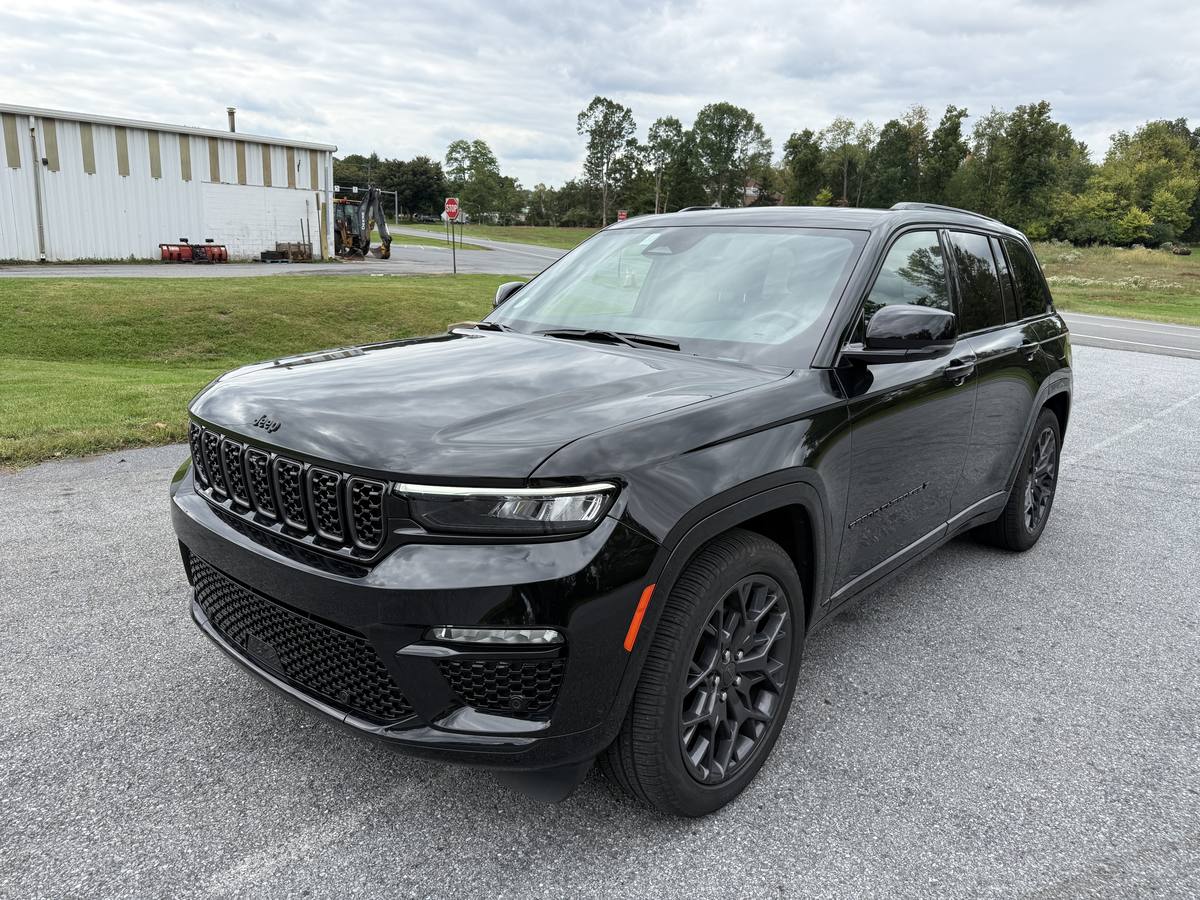 ★ Main photo
- Year, make, model
- 2025 Jeep Grand Cherokee L
- Miles
- 17,565, read from the odometer photo
- VIN
- 1C4RJ••••••••••••, read from the photos
- Starting bid
- Left for you to set
2025 Jeep Grand Cherokee L SUV
Black Jeep Grand Cherokee L, a three row midsize SUV with leather interior and black alloy wheels.
- Make: Jeep
- Model: Grand Cherokee L
- VIN: 1C4RJ••••••••••••
- Exterior color: black
- Interior: black leather seating with contrast stitching, second row captain's chairs with center console and cup holders
- Wheels: black multi-spoke alloy wheels
- Odometer reading: 17,565 miles
- Tire pressure display shows 37 to 39 psi across all four tires
- Dual sunroof panels visible on roof
- Jeep grille with LED headlights and running lights
Condition
- Exterior panels appear straight and glossy with no visible dents
- Interior leather shows no visible wear or staining
- Windshield appears clear with no visible cracks
- Overall vehicle appears clean and complete
A few habits that help.
Shoot the VIN, odometer, or manufacturer sticker
A clear photo of each lets Municibid read details like the VIN, mileage, model, and serial number and add them to the draft for you.
Three photos or more
A listing needs at least 3 different photos. If an item comes up short, its draft is flagged so you know to add one.
Get the whole item in
Start with a wide shot from each side, then the details: damage, hours, tags, and anything included.
Add videos too
JPG, PNG, HEIC, MP4, and MOV all work. A walkaround video is kept with the listing on its own.
Good to know.
Does anything go live without me?
No. Every listing is saved as a draft. Nothing is public until you check the box approving the description and click Post Listing Live.
Do I have to wait on the page while it works?
Only while your photos and videos upload. After that you can close the tab or keep browsing. We email you when your drafts are ready, and if you stay, the page updates on its own.
What if it gets something wrong?
Fix it before you post. Every field can be edited, and if a photo landed on the wrong item, use Move photos between items. Municibid writes the first draft; your agency decides what bidders see.
Who sets the price?
You do. Starting bid, reserve, tax, and end date are always yours. We suggest a starting bid of 10% to 20% of the estimated value, since a low start tends to draw more bidders.
Can I still list items one at a time? (The old way)
Yes. On the Add Your Photos page, click List it manually to pick a category and fill in the listing yourself.
Do I need to set anything up first?
Before your first upload, click Edit terms & payment to set your payment instructions, standing terms, and a default invoice comment. You set them once and they are added to every listing.
Where can I find a full tutorial on this new listing process?
Jackie Blaskovich, Director of Customer Success, put together a deep dive tutorial that you can watch here.
Watch the full tutorial.
Jackie Blaskovich, Director of Customer Success, walks through the whole listing process in this deep dive tutorial.
Prefer to read? Open the step-by-step Selling Tutorial.
Your next auction is a few photos and videos away.
Sign in, click Sell, and drop in what you've got. We'll take it from there.
Start with your photos and videos